
Congrats on finding my website!
Anyway hi, I'm a linux hackerman in his early 20s who likes to code too many things at once.
Games

Kovarust is my attempt at a free Minecraft clone. I'm aiming for it to be a viable replacement for Java Edition eventually. It's written in Rust, and will hopefully be faster and more versatile than the original Minecraft, with as many features actually implemented as plugins as I could manage.
I've redesigned every aspect of this thing about 5 times before it's even compiling, so it'll taking me a while to get it right, but it is progressing.

WIP, but playable
Bounce-a-Meteor is a simple survival game where you need to protect Earth from meteors using giant trampolines mounted on either side of the planet. You need to strategize (or at least try, in the chaos) and smash together meteors, combining them and making them definitely easier to manage with absolutely no downsides whatsoever.
BaM was my first ever (and probably last) game I uploaded to
Google Gay Store when I was about 16, and man was that a
painful process.
As Unity was all I knew about game dev at the time, that's what I made
it in - the game was buggy and weird and the "animations" were a
hack-job, but it brought in 5¢ of ad revenue all-time, so it wasn't a
complete waste of effort...
Anyway, because Google is Google, the game got taken down for not having a stoopid "pRivAcY PoLIcY" because GOOGLE'S OWN AD PLUGIN collected user data, and then a year later after I fixed that, it just disappeared again for no reason whatsoever.
I eventually decided to ditch both Google and Unity and start
remaking BaM on a more usable platform. I was really getting
into Processing at the
time, and what I came up was a fun game, but APDE's simplistic nature
limited my app to a proof-of-concept.
Of course, the next step would be to (again) rewrite on a more usable
platform. And, what better platform than barebones Rust, with all its
extensive Android support and mature gaming ecosystem? /s
It was definitely a challenge working out the toolchains, but I managed to get an APK compiling, and even a WASM web app. Since BaM is still WIP, I'm only hosting the Android & web version at the moment, but the plan is to put it on F-Droid and collect some spare change from itch.io, sooner rather than later.
Tetris
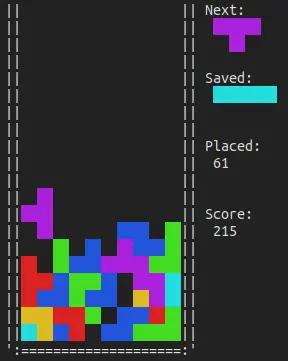
Back in the good 'ol days before I started learning Rust (and subsequently rendered my PinePhone useless by desoldering its SIM card reader using rustc), I just felt like playing Tetris.
So, in between pretending I was learning how to do loops in java for
uni, I ended up making this in a day in C. It's under 400 lines long, so
it could be used to dissect and learn programming in C, I guess.
Not that it's especially good code, but still.
2D Raycaster
Back when I was early into learning C, I figured I'd try making a 3D-esque game engine similar to DOOM. I knew nothing about graphics or GPUs, meshing, rasterization, or any of that advanced stuff (looong before I started learning Rust, let alone working on real graphics for Kovarust).
What I did know, however, was simple math - for each horizontal screen position, I raycast in the appropriate direction and drew a column inverse to the distance. While I was at it, I figured raycasting would make it easy to add non-Euclidean spaces (by way of portals), so I did that and ended up with a pretty neat terminal maze explorer.
(ok I cheated actually, I made something vaguely similar in a BASIC game-making app ages ago, but it was pretty janky)

3D Engine
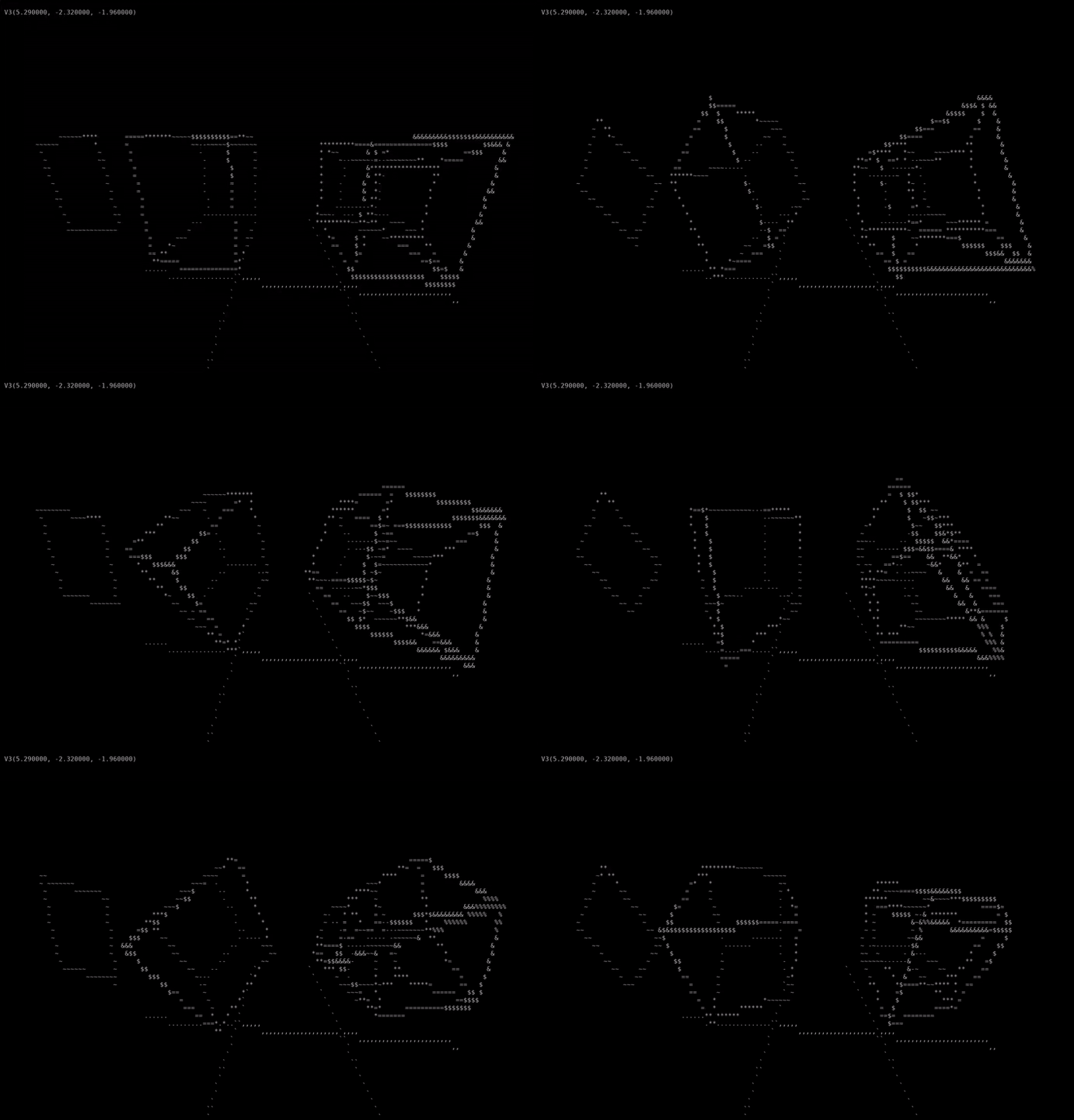
After doing the above 2D raycaster, I figured it might not actually be that hard to make something similar to real GPU rasterization in the terminal with basic trig (matrices were still a foreign concept to me). Halfway through the project I quickly threw full triangle rasterization out the window, but I was left with a true 3D environment and wireframe props.
I didn't really know what to do with this - the original idea was to publicize it as some sort of rendering engine, but without rasterization it'd be a bit hard to look at for long periods of time. So instead, I turned it into a demo for rotating stuff using trig functions in 2, 3, and because why not, 4 dimensions.
good luck decrypting my old C code tho lol
Random scripts
A collection of games I wrote in zsh for one reason or
another. Note you'll probably have to chmod +x to run
these. Also I haven't tested them in bash becuase it's gay and
you should be using zsh.
pong.sh is Pong in shell. W/S & J/K to move the paddles. Good luck with the collision system.
1248.sh is a minimal shell implementation of the classic 2048, but in a terminal and with Vim controls (also featuring saving/loading games). To save on space, tiles are incremented linearly instead of doubling (2048 = 2 ^ 11). If you have any other questions, consult the sauce.
Tools
Random scripts
A collection of utilities I wrote in zsh for one reason or
another.
Note you'll probably have to chmod +x to run these. Also I
haven't tested them in bash becuase it's gay and you should be
using zsh.
bytecalc is a byte unit converter, that is, working in
multiples of 1024.
(fend is good for
this and a lot more)
list is a (janky) list iterator
- basically, loop over each line in a list and run a command on it. If
the command works, remove the line, otherwise keep it to maybe retry
later. I use it for mass curling memes and ignoring the URLs
with duplicate filenames until after I categorize the previous
batch.
NO MEME LEFT BEHIND
dewit is like a user-level version of runit (i.e. a user-service manager) that you can put in your crontab. I use it to run my website.
sc's just my screenshot command,
using crud to select a window/area and shotgun to
actually get the picture. Then it either copies it to the clipboard or
saves it to a file, if one is specified.
I had shotgun & crud listed the
wrong way for the longest time. -_-
omfg, a month later I realize I only had
crud and crud listed
Rust Libraries
If you're here from crates.io and wondering where ShitHub is, it's gay and I refuse to use it.
This website doubles as a Cargo registry for libraries I wrote over time and a couple of my game projects (WIP). At first I was uploading some stuff to crates.io and even got a few downloads, but as a matter of principle I'd rather sacrifice a bit of publicity for self-reliance and freedom from a ShitHub account, and having to make a stoopid "loicense" file.
Though I'm not mirroring the dependencies, so if crates.io
ever goes down stuff will break... might be a good idea even if they'd
massively bloat everything.
Another caveat is I'm not gonna host each individual version of my
projects, only the latest, so you might need to update your project's
lock file occasionally.
To use the registry, append this to your .cargo/config.toml, and
when adding dependencies with Cargo, use:
cargo add --registry tesseract ...
arg-kit
arg-kit is a featherweight library that helps parse
arguments using one of Rust's most versatile and powerful syntaxes:
match {}
Do you really need bloated proc macros when collecting arguments can
be simplified to a .next()? You have zero indication of
what's going on under the hood, so you can't implement your own
behaviour.
That is why I don't call it an "argument parser" on its own. Your program parses the arguments, this just helps iterate over it, like so:
let mut argv = std::env::args();
for_args!(argv; {
    arg!(-h | --help) => eprintln!("{HELP_TEXT}"),
    arg!(-v | --value) => do_something(argv.next()?),
    unknown => panic!("Unknown argument {unknown}"),
});
...which expands to:
let mut argv = std::env::args();
while let Some(args) = argv.next() {
    for arg in args.as_arg() {
        match arg {
            Argument::Short("h") |
            Argument::Long("help") =>
                eprintln!("{HELP_TEXT}"),
            Argument::Short("v") |
            Argument::Long("value") =>
                do_something(argv.next()?),
            unknown => panic!("Unknown argument {unknown}"),
        }
    }
}mew
WIP, but definitely working
As you might have guessed, I've got a terminal (not tty) case of made-at-home syndrome - I'd rather make a complete system from scratch than learn a probably-bloated pre-existing framework, that somehow simultaneously overcomplicates and oversimplifies everything with no room for optimization. So, I figured I'd just learn how graphics worked under the hood.
wgpu is a 1:1 API for the WebGPU standard. While that makes it very portable, versatile, and pretty well-documented, since I'm not a hardcore graphics chud, I don't find it very intuitive to use. My main problem with it is how many bloody times you need to define the same thing, and quadruple-check that all the layouts line up with each other.
After my first attempt at real graphics, I concluded wgpu wasn't fit for use directly by an end-user application. The obvious next step was to read docs, find patterns in the graphics stack, read docs, come up with a data model, read docs, and extract everything I've learnt along the way into a library. And then read some more docs.
This library aims to, at least a little bit, make it easier to define
all the related information in one place (in wrapper structs). It
primarily uses like 20 macro_rules! to write boilerplate
that generates buffer, bind group, and pipeline layouts. It also stores
them in a convenient "render context" struct - see the example for
details, but compare the below to having to reference 50 pages in
wgpu's docs to get a pyramid to spin (I've done that job for
you).
sampler! { Sampler as Filtering }

texture! { Texture {
    usage: COPY_DST | TEXTURE_BINDING,
    format: Rgba8UnormSrgb,
    dimension: D2,
    sample_type: FloatFiltering,
} }

vertex_struct! { Vertex [
    0 pos => Float32x3,
    1 uv => Float32x2,
] }

buffer! { VertexBuffer <Vertex> as STORAGE | COPY_DST | VERTEX }

shader_struct! { TransformMatrix [
    0 mat => Mat4x4f,
] }

buffer! { TransformBuffer <TransformMatrix> as UNIFORM | COPY_DST }

bind_group! { Group [
    0 texture @ FRAGMENT => Texture,
    1 sampler @ FRAGMENT => Sampler,
    2 transform @ VERTEX => TransformBuffer,
] }

pipeline! { Pipeline {
    bind_groups: [
        0 => Group,
    ],
    vertex_types: [
        0 => Vertex,
    ],
    fragment_targets: [
        0 => ALPHA_BLENDING ALL as SURFACE,
    ],
    push_constants: [],
    depth: None,
    cull: Some(Front),
} }

render_context! { RenderContext {
    features: [],
    limits: [],
    bind_groups: [
        0 => Group,
    ],
    pipelines: [
        0 => Pipeline,
    ],
} }
Again, the point isn't to create an entirely new graphics framework - or any sort of framework at all, really - rather, just to make it maybe easier for us mortals to keep on top of the rendering pipeline, while still giving complete control over what runs when.
I would still definitely recommend following the wgpu tutorial at least once to get familiar with the concepts, if you've never dealt with low-level graphics shenanigans before.
also jesus fuck, how many breaking updates can wgpu get between each time I look at it